GPS and Fall Detection for Older Adults: What to Look For
When choosing a medical alert system for an older adult, two features often come up: fall detection and GPS location tracking. Many people wonder whether both are necessary, or if fall detection alone is enough. The short answer is that it depends on the person’s lifestyle and daily routines. For someone who spends most of their time at home, fall detection may be sufficient. For those who are active outdoors, travel, or live with mild memory loss, GPS can be just as important as fall detection. The best approach is to look at how the person actually lives, then decide which combination of features makes sense.
How fall detection works
Fall detection uses sensors built into a wearable device to recognise sudden movements that suggest a fall. When a fall is detected, the device can automatically send an alert to a response centre or to nominated family members. This automatic trigger is the key advantage: if the person is unconscious or disoriented and cannot press a button, the device still raises the alarm. Older adults who live alone or spend time in rooms where they might not be found quickly benefit most from this feature.
Fall detection is not perfect. Sensors can be fooled by rapid bending, dropping the device, or certain types of hard impacts that are not falls. Some devices use multiple sensors or algorithms to reduce false alarms, but no system catches every fall. It is also worth noting that a fall sensor only helps if the person is wearing the device. For that reason, comfort and ease of wearing matter a great deal. Wearing options such as a pendant, a wristband, or a clip that attaches to clothing can make it more likely that the device stays on the body.
Why GPS location matters
GPS tracking in a medical alarm does something that fall detection alone cannot: it tells responders where the person is. If an older adult falls while out for a walk, in a garden, or in a part of the house that is hard to describe, GPS provides the exact coordinates. This can reduce the time it takes for help to arrive, especially if the person is unable to speak or confused after the fall.

Beyond falls, GPS is valuable for people who may wander due to dementia or memory issues. A wearable with GPS lets a caregiver locate them quickly if they become lost. In such cases, the GPS is a safety net that works even when the person has not pressed an SOS alert. Some devices combine GPS with a cellular connection so the location updates even when the person is away from home Wi-Fi.
There is a trade-off. GPS uses more battery power than basic fall detection, so the device may need charging more often. Also, GPS signals can be weaker indoors or in dense urban areas, though most modern devices handle this by switching to Wi-Fi or cellular triangulation when satellite signals drop.
When each feature matters most
A person who rarely leaves the house and has good mobility might not need GPS. For them, fall detection plus a manual SOS button is likely enough. The device stays at home on a table or worn as a pendant, and if a fall happens, the automatic alert or a press of the button calls for help.
On the other hand, an older adult who walks the dog, visits friends, or goes shopping alone will get real benefit from GPS. If they fall in a park or on a footpath, the GPS tells responders exactly where to go. For someone with early-stage dementia who might wander, GPS can be the difference between a short scare and a longer search.
Some people fall into a middle zone. They are mostly at home but spend time in a large property, a community garden, or a relative’s house. In those cases, GPS can help if they fall in a spot that is not obvious. It is also useful if they drive themselves to appointments and could be anywhere if they need help.
Considering the cost and commitment
Medical alert systems vary widely in how they charge. Some require a monthly subscription, which covers monitoring and sometimes device replacement. Others, like those offered by familyr.co.nz, have no monthly fees. This can make a big difference for families on a fixed budget, because the upfront cost is the only cost. Over time, a no-monthly-fee model can save money, and it removes the worry of forgetting to pay a bill or the system being cut off if a payment is missed.
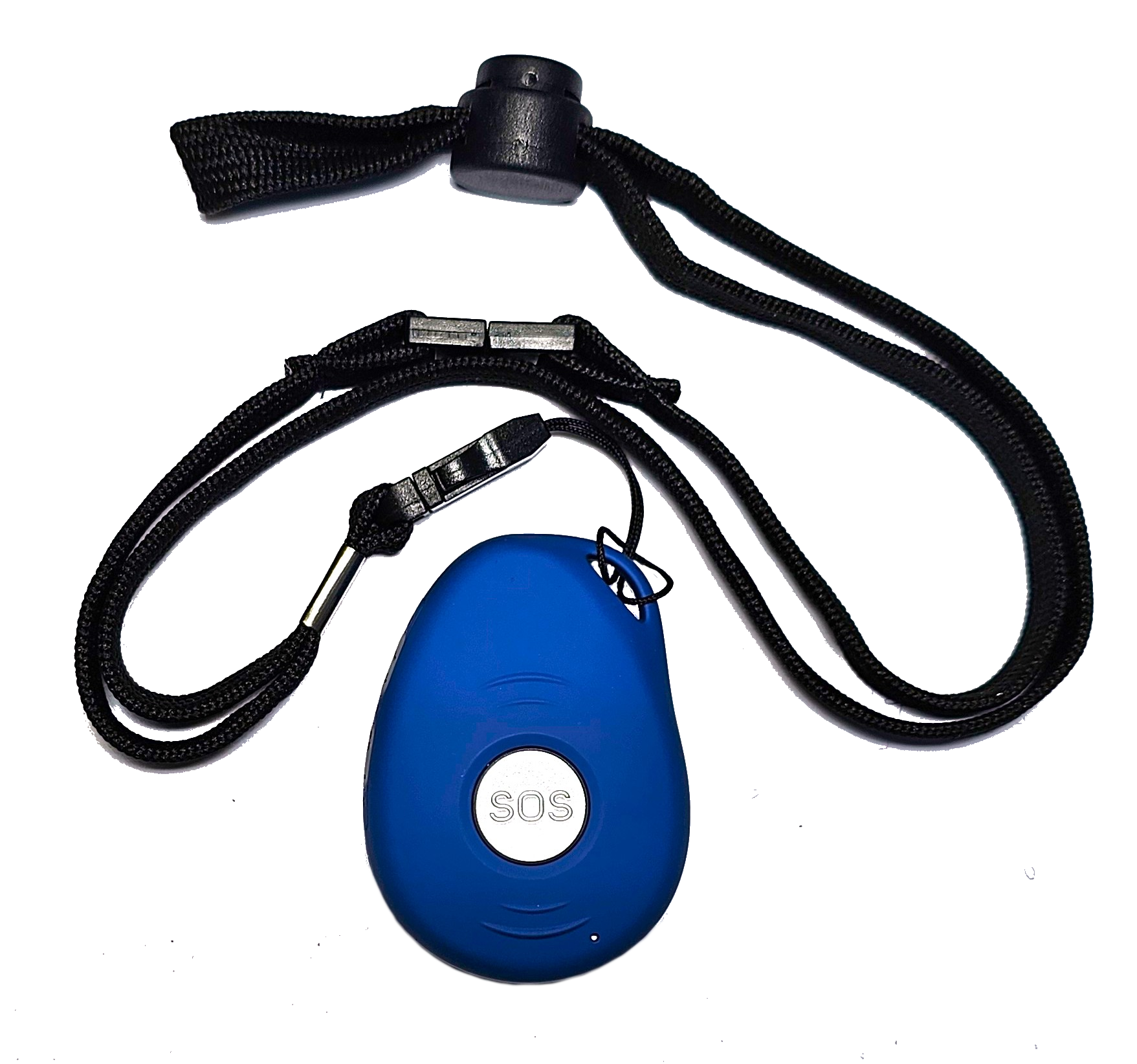
When comparing devices, look at what is included in the price. Some devices with no monthly fees still offer fall detection, GPS, SOS alerts, and two-way voice communication. Others may charge extra for GPS or fall detection features. It is worth checking the warranty and support offered, because a device that fails after a year could be expensive to replace if it is not covered.
What to check before buying
- Battery life and charging routine: GPS uses more power, so check how often the device needs charging and whether it has a low-battery alert.
- Wearing options: A pendant may feel comfortable for some, while others prefer a wristband or a belt clip. The device is only useful if it is worn.
- Fall detection accuracy: Ask about false alarm rates and how the device distinguishes falls from other movements.
- GPS performance indoors: See if the device uses Wi-Fi or cellular positioning to maintain location indoors.
- Voice communication: Two-way voice lets the response centre talk to the person, which can help assess the situation before sending help.
The role of SOS alerts and voice communication
An SOS button is a manual trigger that the person presses when they need help. Even if fall detection is automatic, a manual button gives the person control. They can press it for any emergency, not just a fall. A heart attack, a sudden illness, or a feeling of being unsafe can all be reasons to use the SOS alert.
Two-way voice communication adds another layer. When the alert is triggered, a responder can speak through the device to the person. The person can explain what happened, and the responder can reassure them, gather details, and decide whether to dispatch an ambulance, a family member, or a neighbour. This can reduce unnecessary callouts and speed up appropriate help. Voice communication also helps if the person is confused or unable to press a button, because the responder can talk them through what is happening.
Putting it together: matching the device to the person
There is no single right answer for every older adult. The decision depends on their health, daily habits, and how much independence they want. A device with fall detection and no GPS might suit someone who stays home. A device with both fall detection and GPS suits someone who is active and mobile. A device with GPS but no fall detection might be enough for someone who is steady on their feet but prone to wandering.
Another factor is who will respond. If the family lives nearby and can check in quickly, a simple alert to their phones may be enough. If the person lives alone far from family, a system with GPS and voice communication gives the family more peace of mind because they can see the location and speak to the person before deciding what to do.
Finally, think about ease of use. Medical alarms should not be complicated. The person should be able to wear it, charge it, and press a button without confusion. Devices with clear instructions, simple buttons, and reliable support are better for older adults who may not be comfortable with technology.

For families exploring these options, a system like the one offered by familyr.co.nz combines fall detection, GPS, SOS alerts, and two-way voice communication with no monthly fees. This means the only cost is the device itself, and the features are available from the start without ongoing charges. It is worth reading the details of any device carefully to see exactly what is included, especially around GPS performance, battery life, and warranty coverage.
In short, older adults benefit most from a system that matches their actual life. Fall detection is a strong safety net, but GPS adds a layer of protection that can be just as important for active people or those with memory concerns. Looking at the full picture - how the person lives, who will help them, and what the device costs over time - will guide you to the right choice.